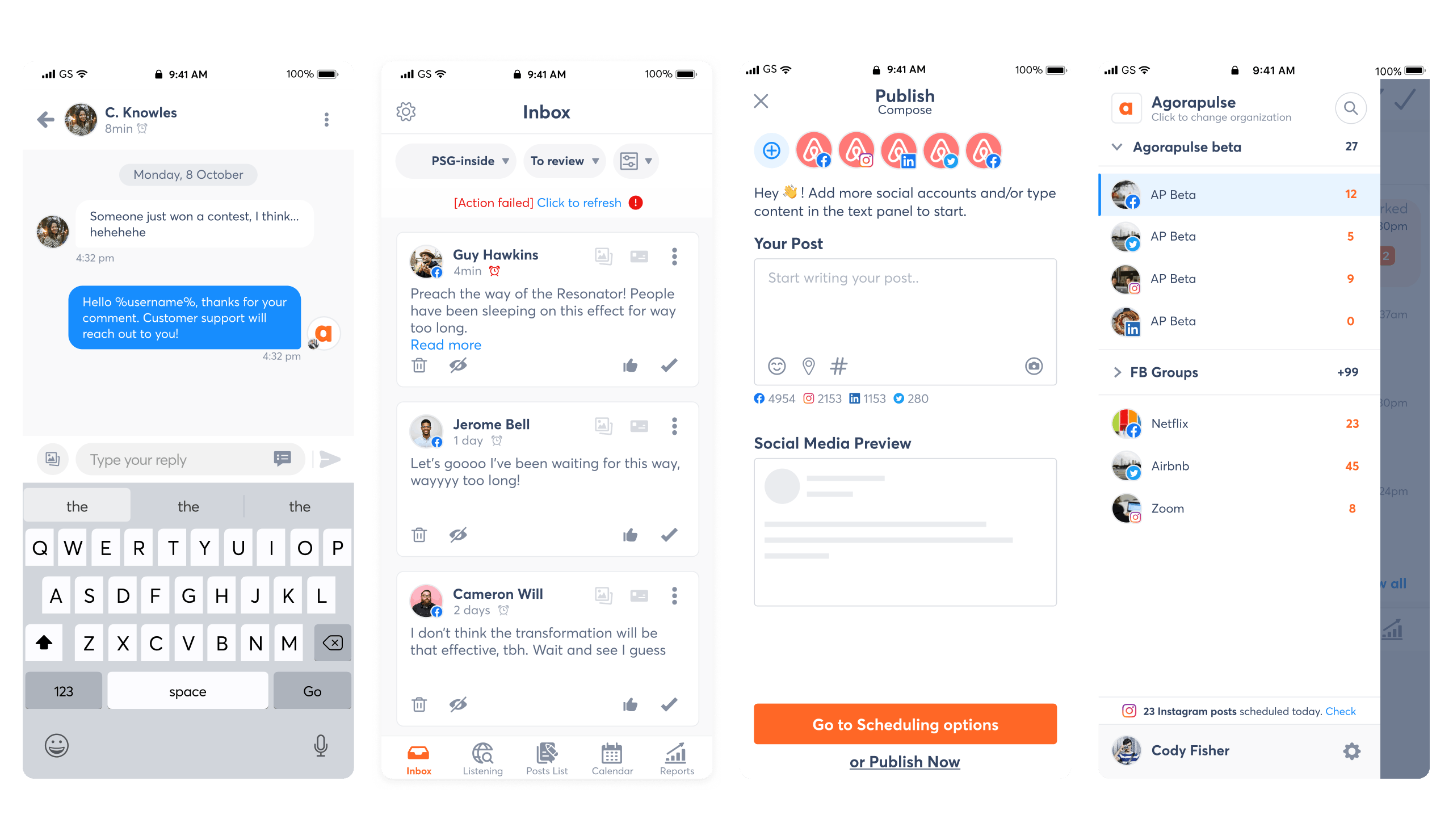
FULL PRODUCT REVAMP @AGORAPULSE

Redesigning every feature, flow, and interface to build a modern, unified, and scalable SaaS product.

INTRODUCTION

Agorapulse is a powerful social media management platform used by thousands of professionals every day.
But after years of incremental growth, the product had become visually inconsistent, structurally fragmented, and increasingly complex to maintain.

As Head of Design, I led a complete, end-to-end revamp of the entire product ; across web, mobile, every feature, and the entire interface layer.
This transformation included rebuilding the UI language, rethinking all major flows, and creating a brand-aligned design system from scratch.

BEFORE & AFTER - A UNIFIED EXPERIENCE

Before the revamp, the product experience was a mix of components and patterns built across more than eight years.
Different interaction models coexisted, visual styles clashed, and users experienced a steep learning curve between features.

To highlight the scale of the transformation, here is a snapshot of how the product evolved

(drag the slider from left to right to reveal)


Sign-up / Onboarding
We refreshed the onboarding experience to create a smoother, more trustworthy first impression with clearer steps and stronger guidance.

before-sign-up-agora-ok-min Sign-up-agorapulse-after-min

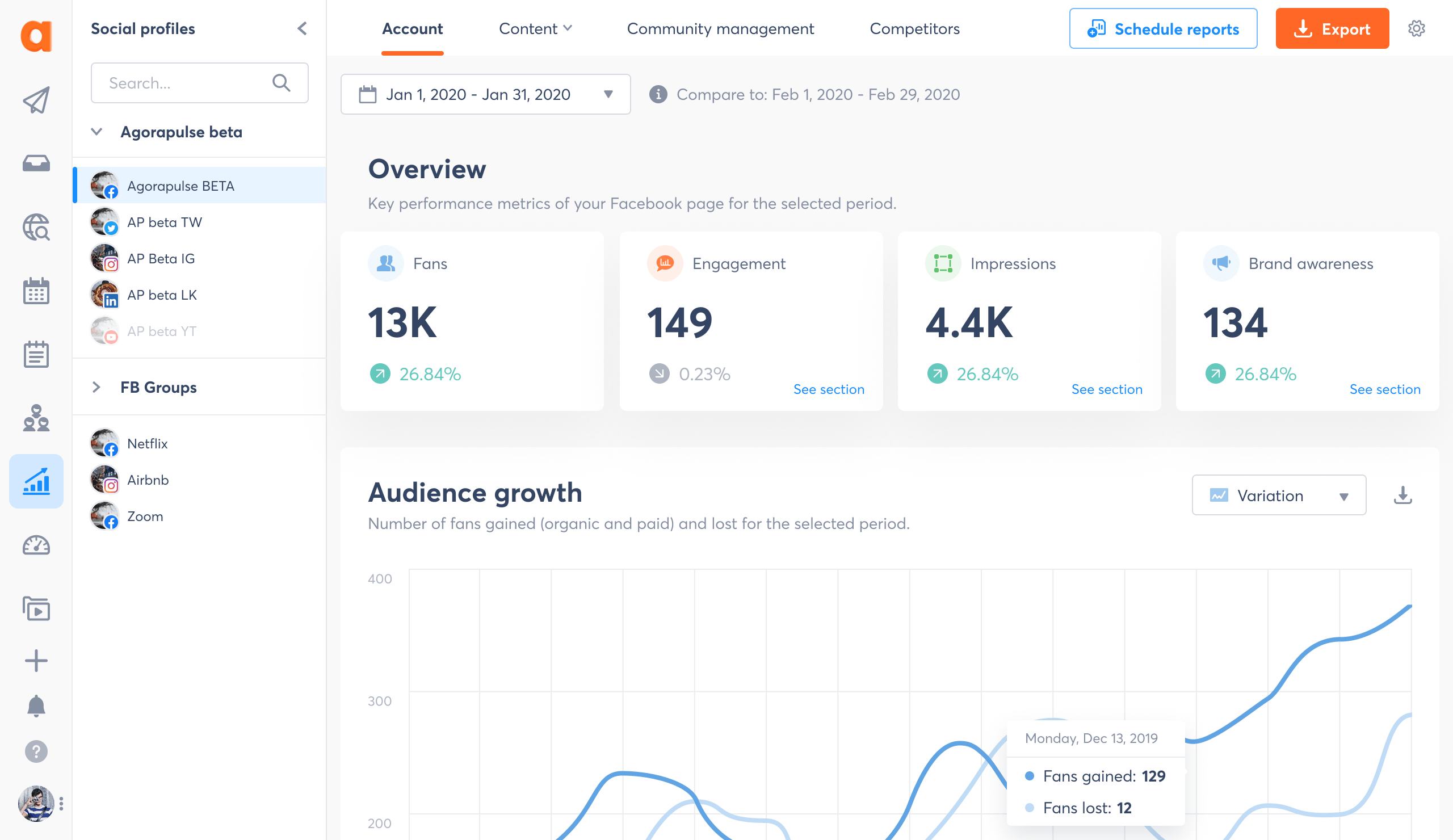
Reports
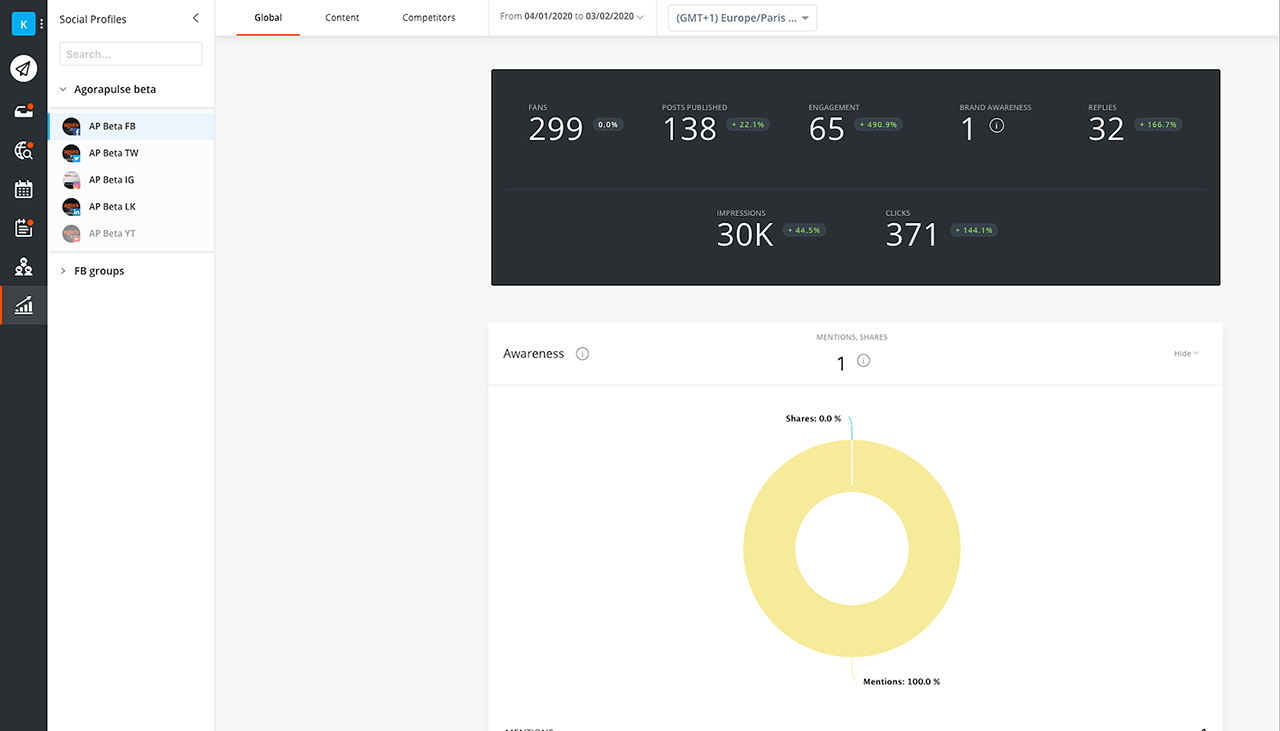
The analytics experience was restructured to surface key insights, unify visualization patterns, and improve readability at scale.

reports-agorapulse-before-2-def-min reports-agorapulse-after-2-ok-min

Inbox
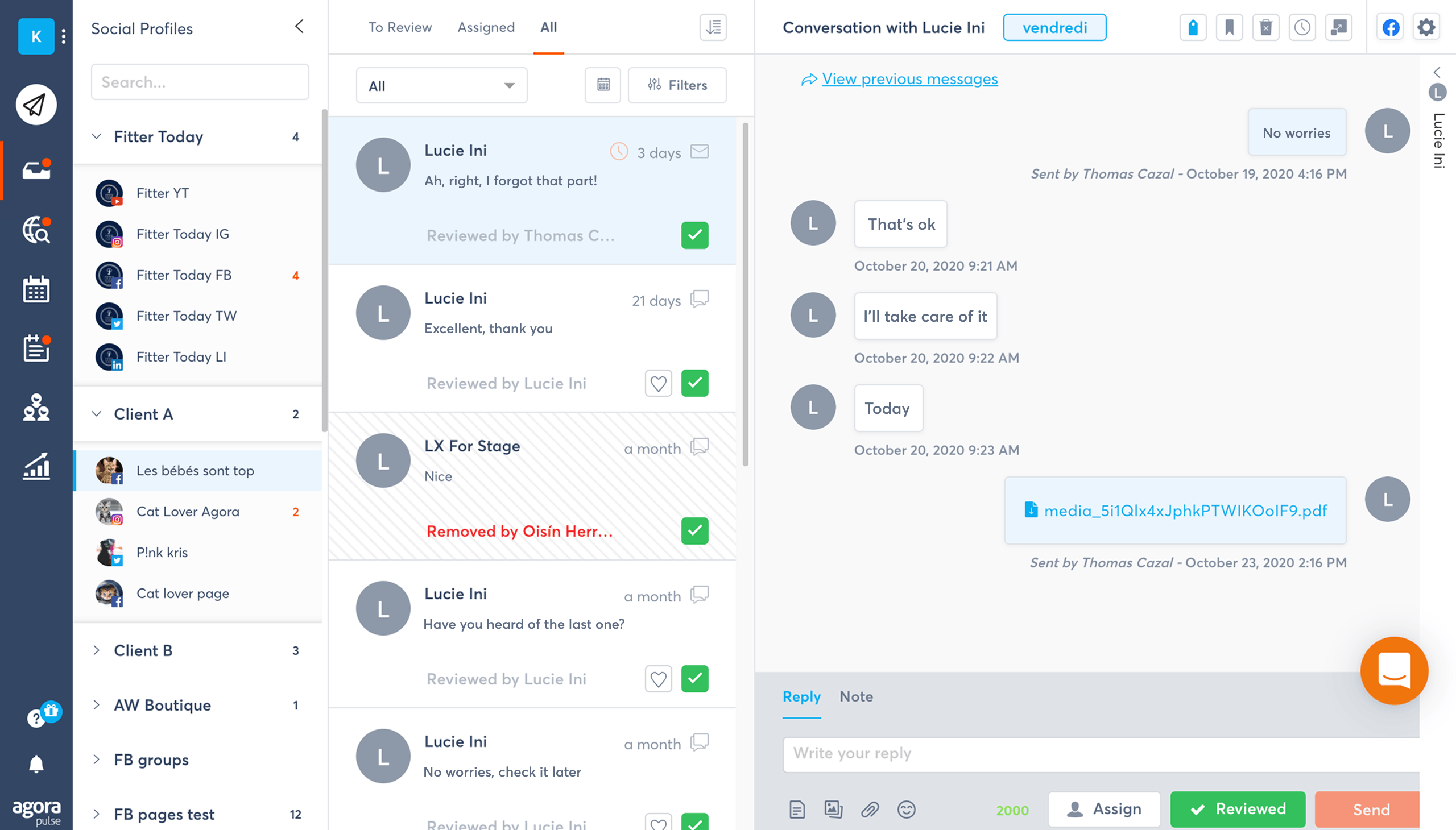
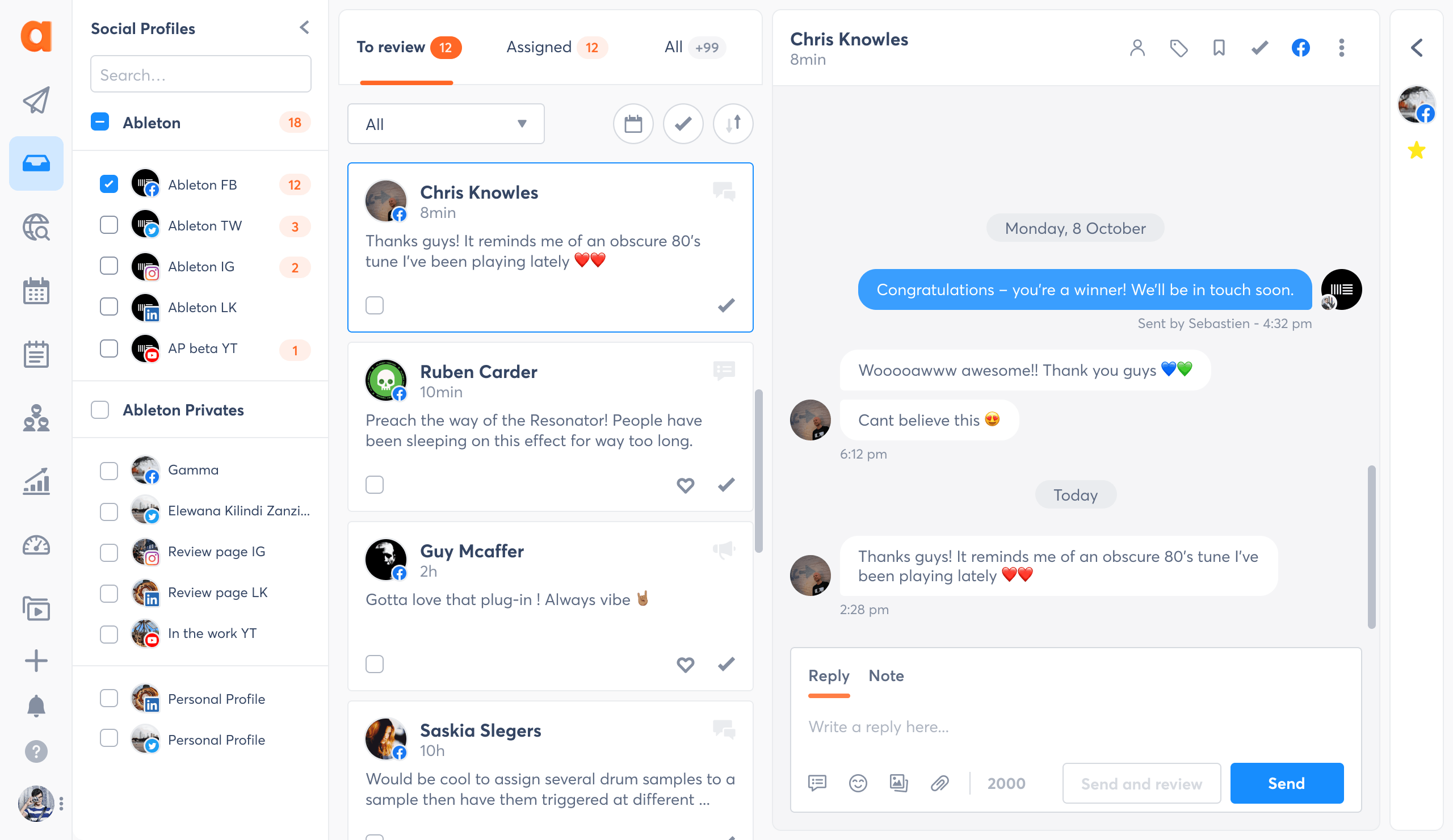
The inbox was modernized with a cleaner layout, clearer statuses, and a more efficient message triage flow for faster moderation.

inbox-before-agorapulse-2-min inbox-agorapulse-after-2-min

Publishing
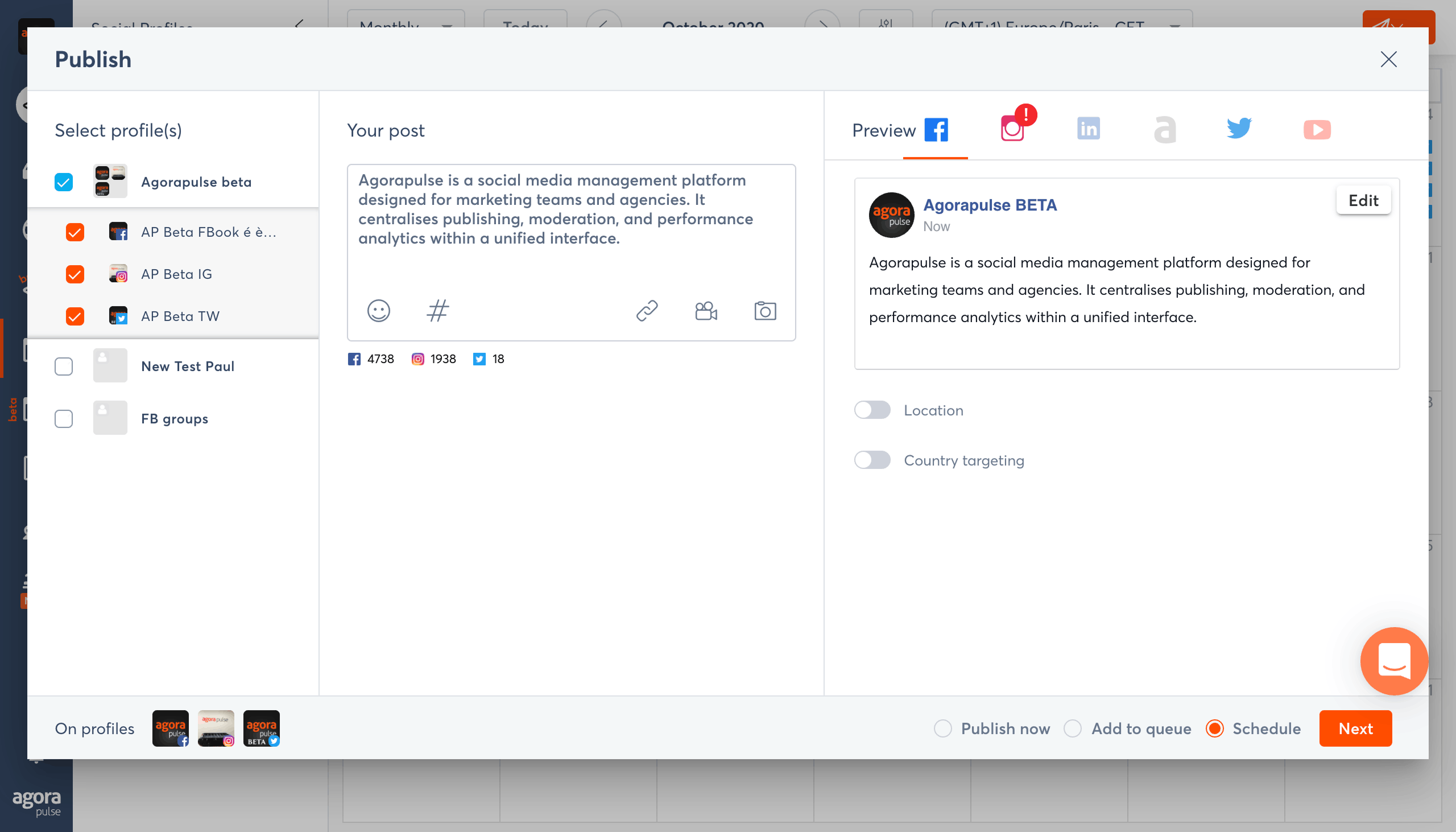
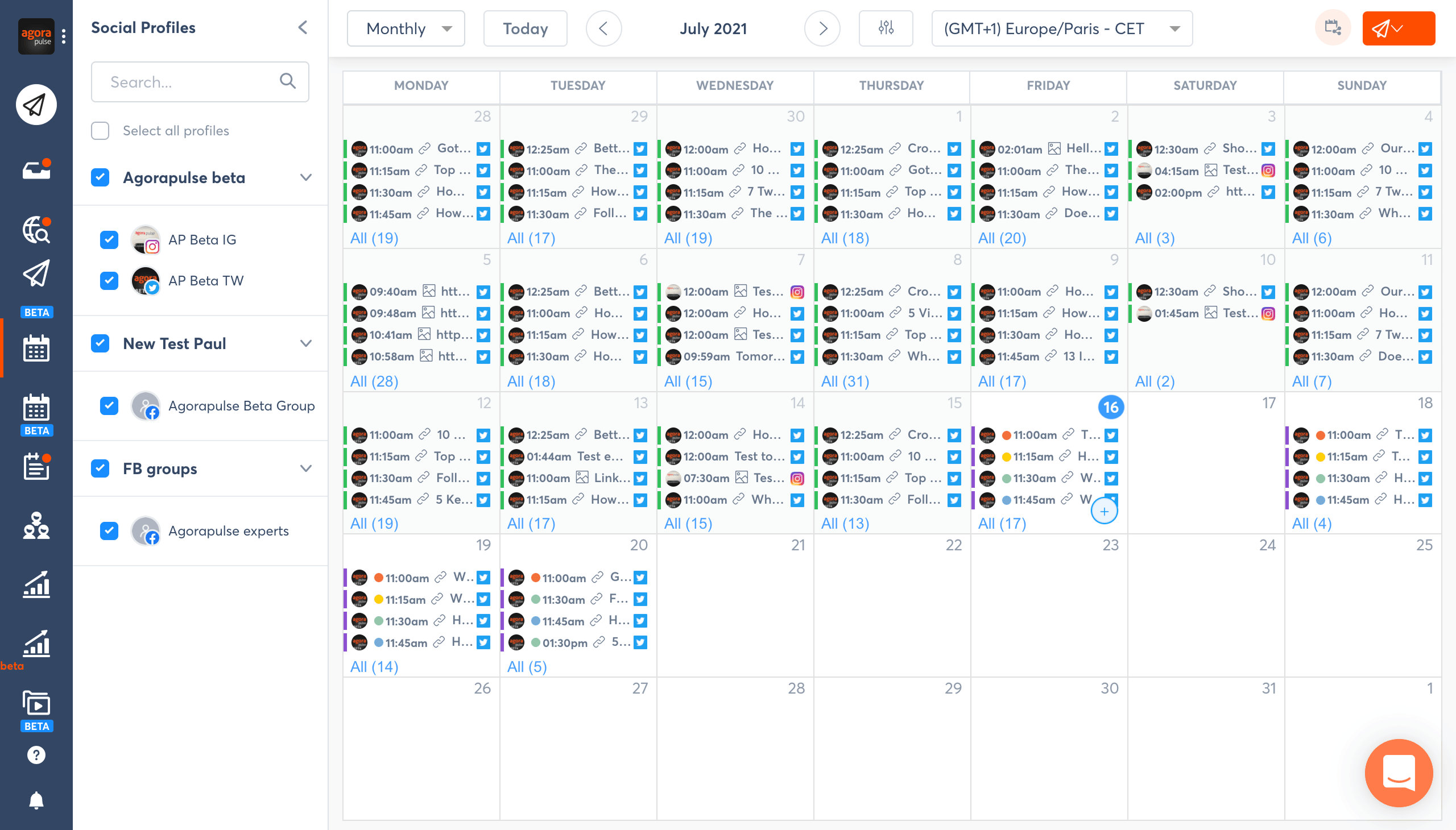
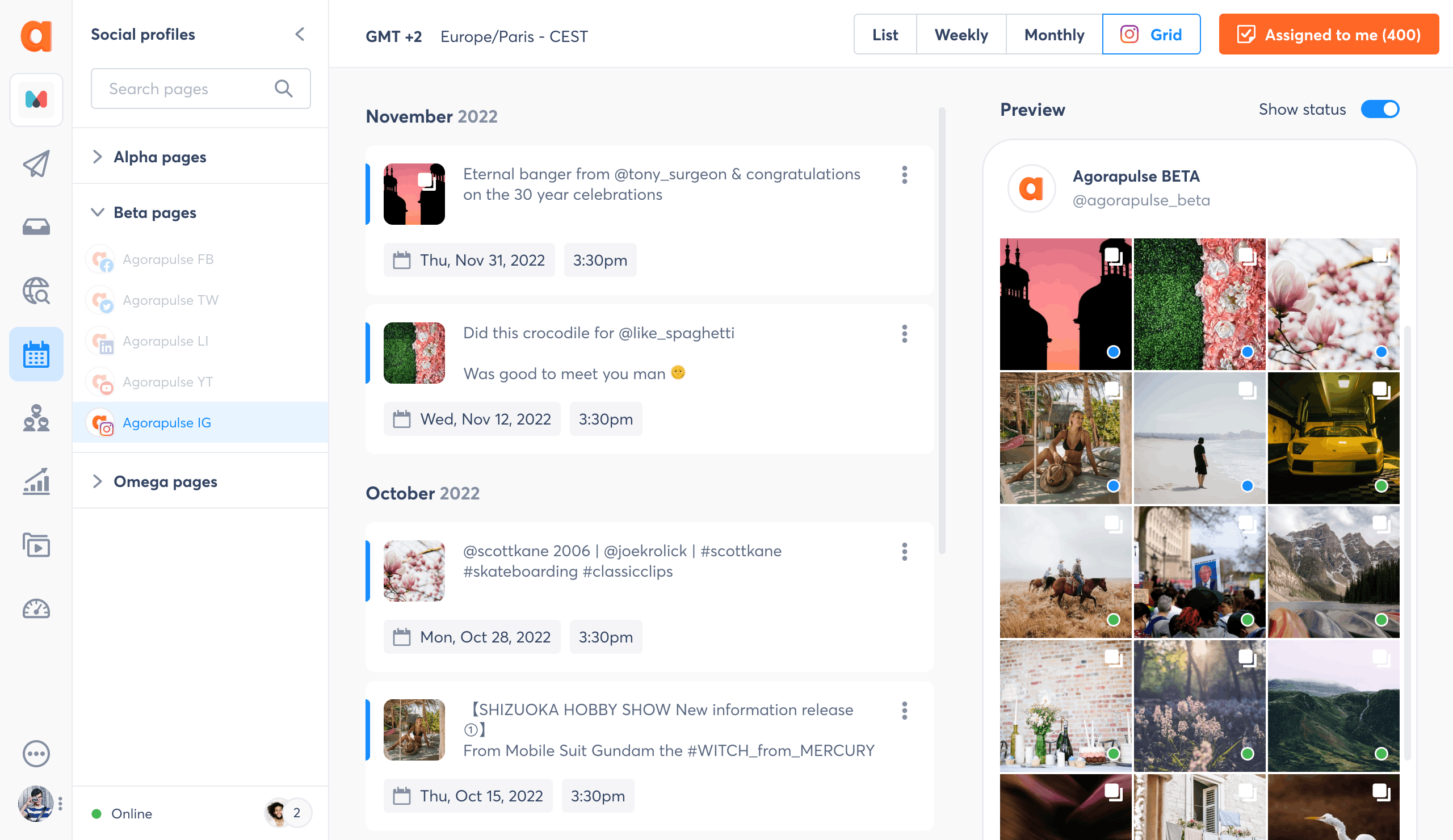
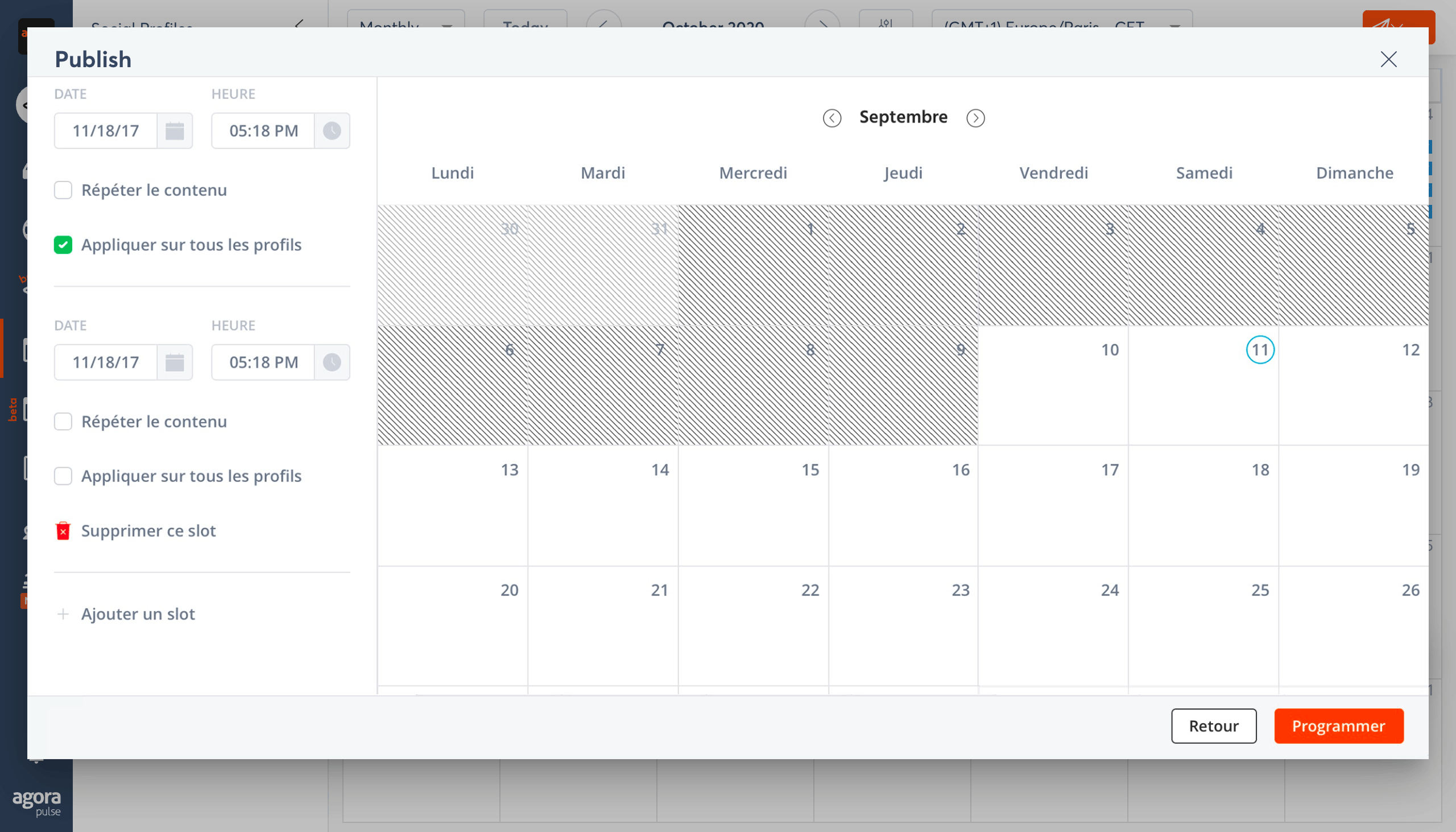
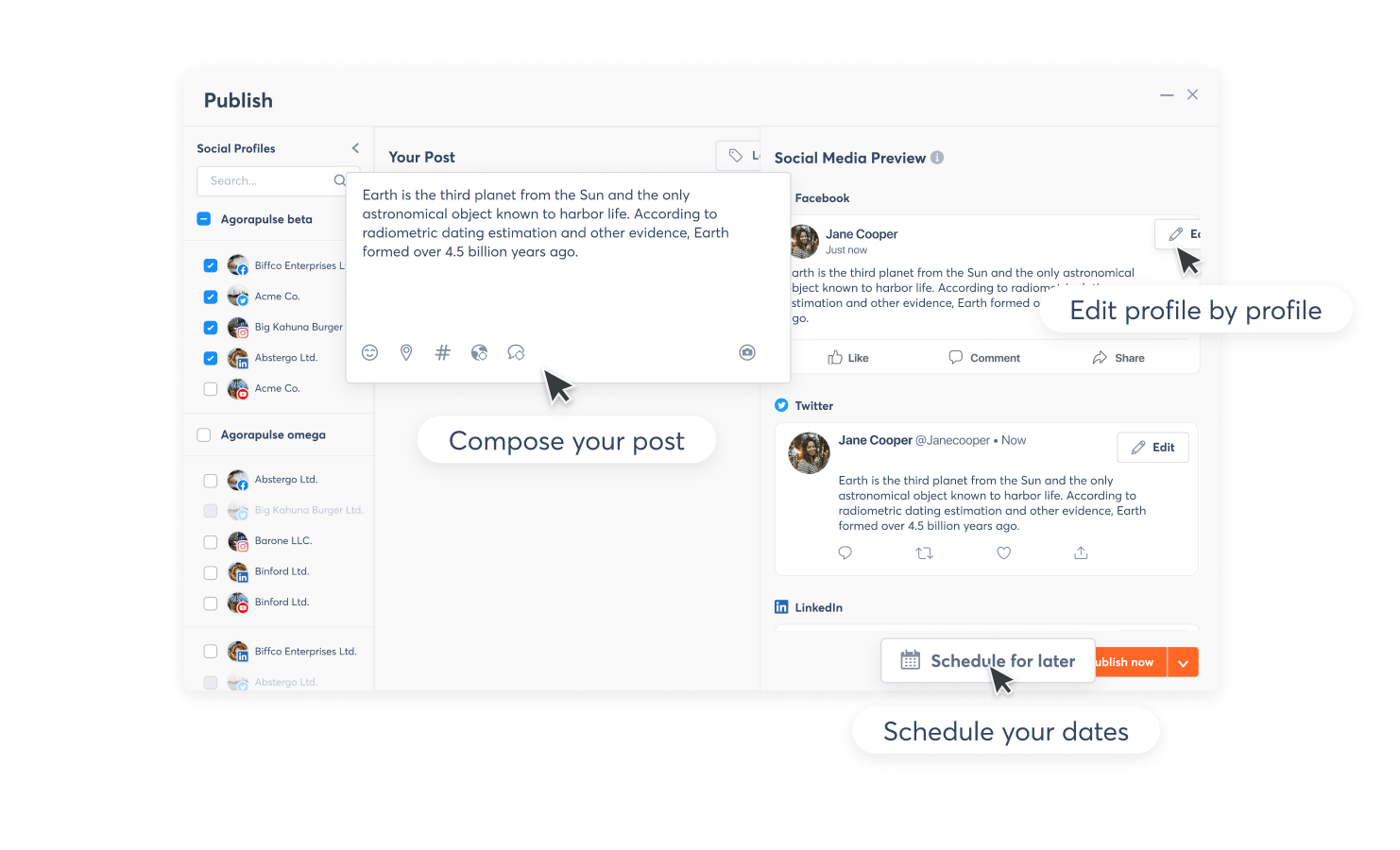
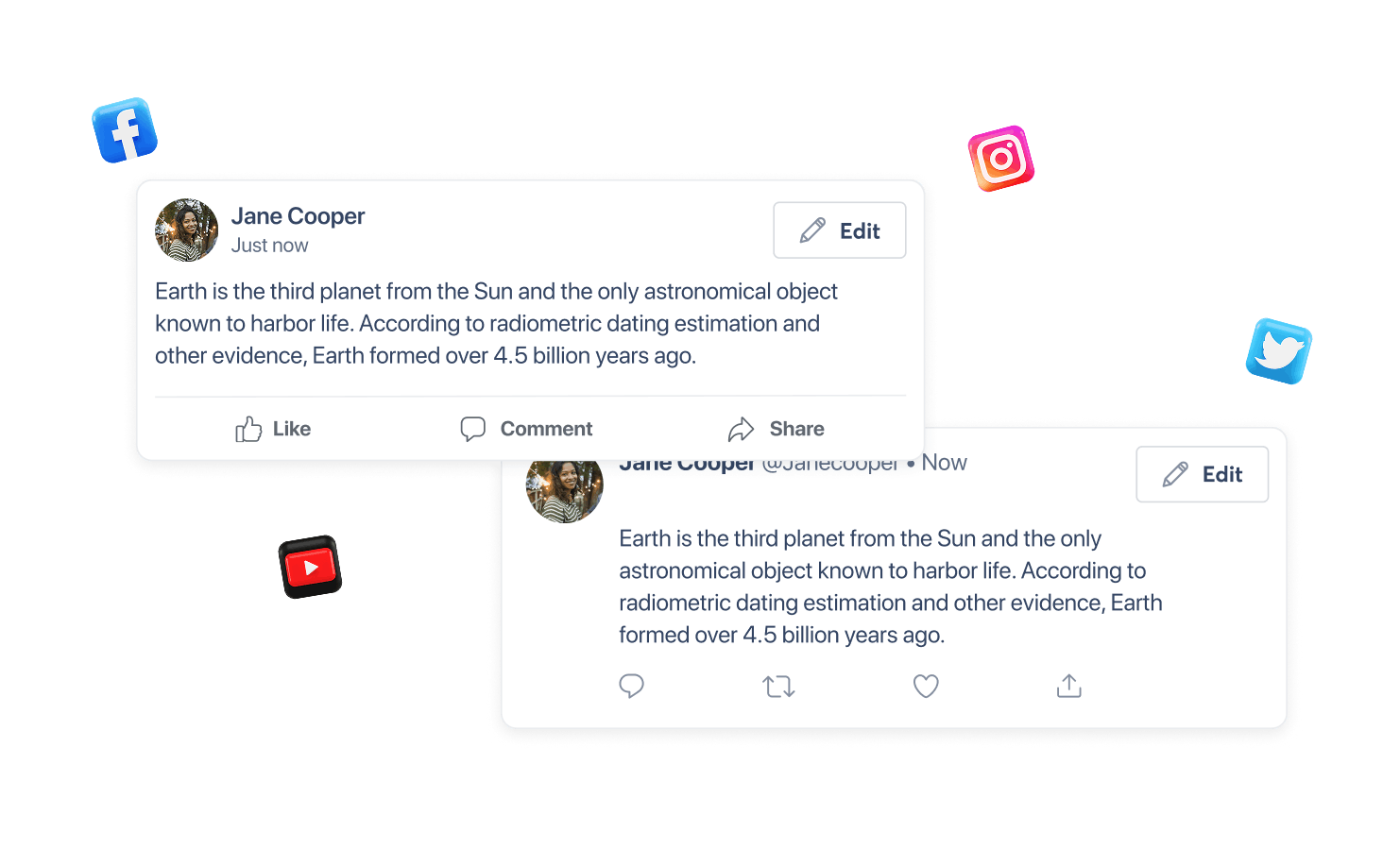
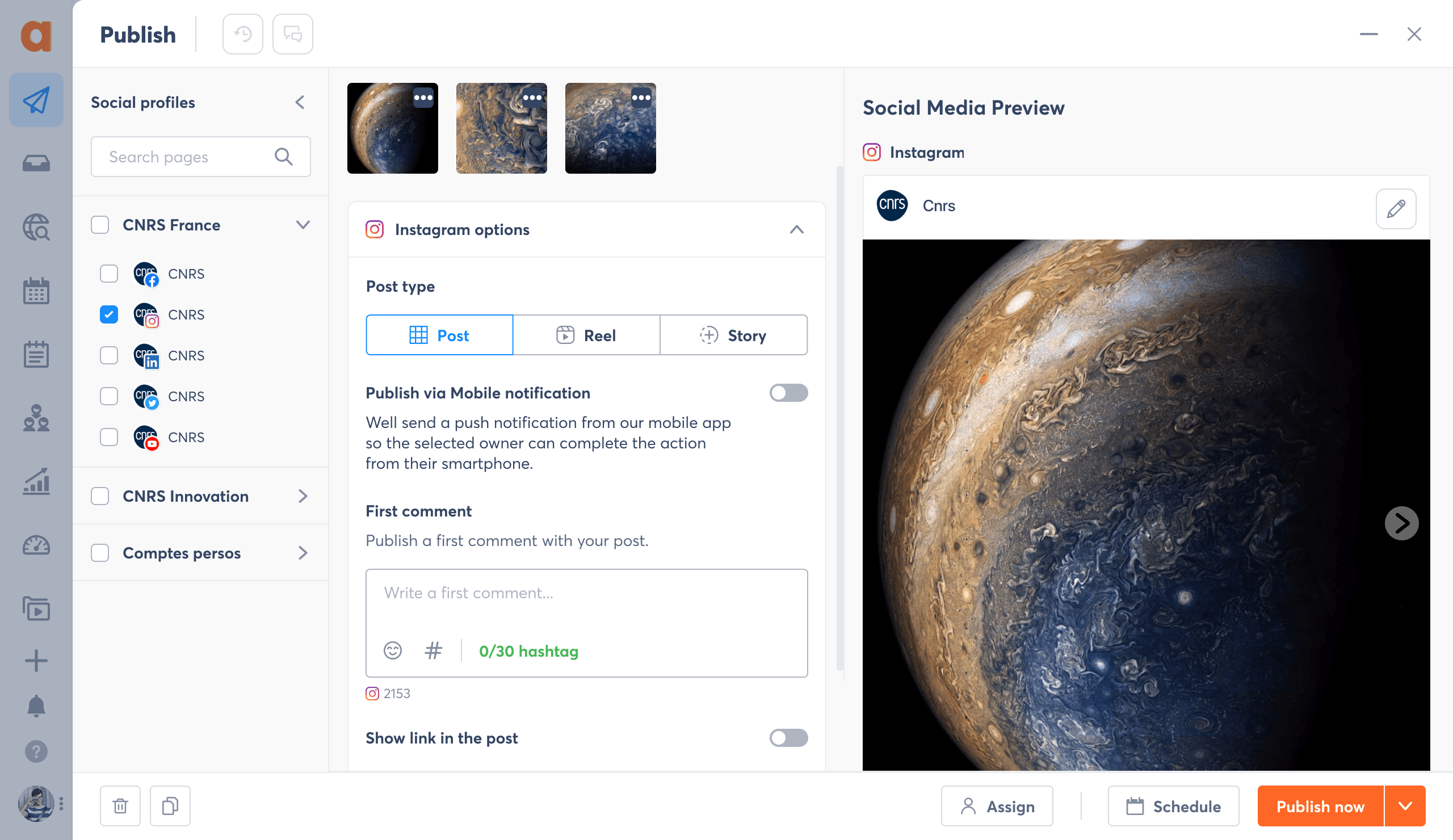
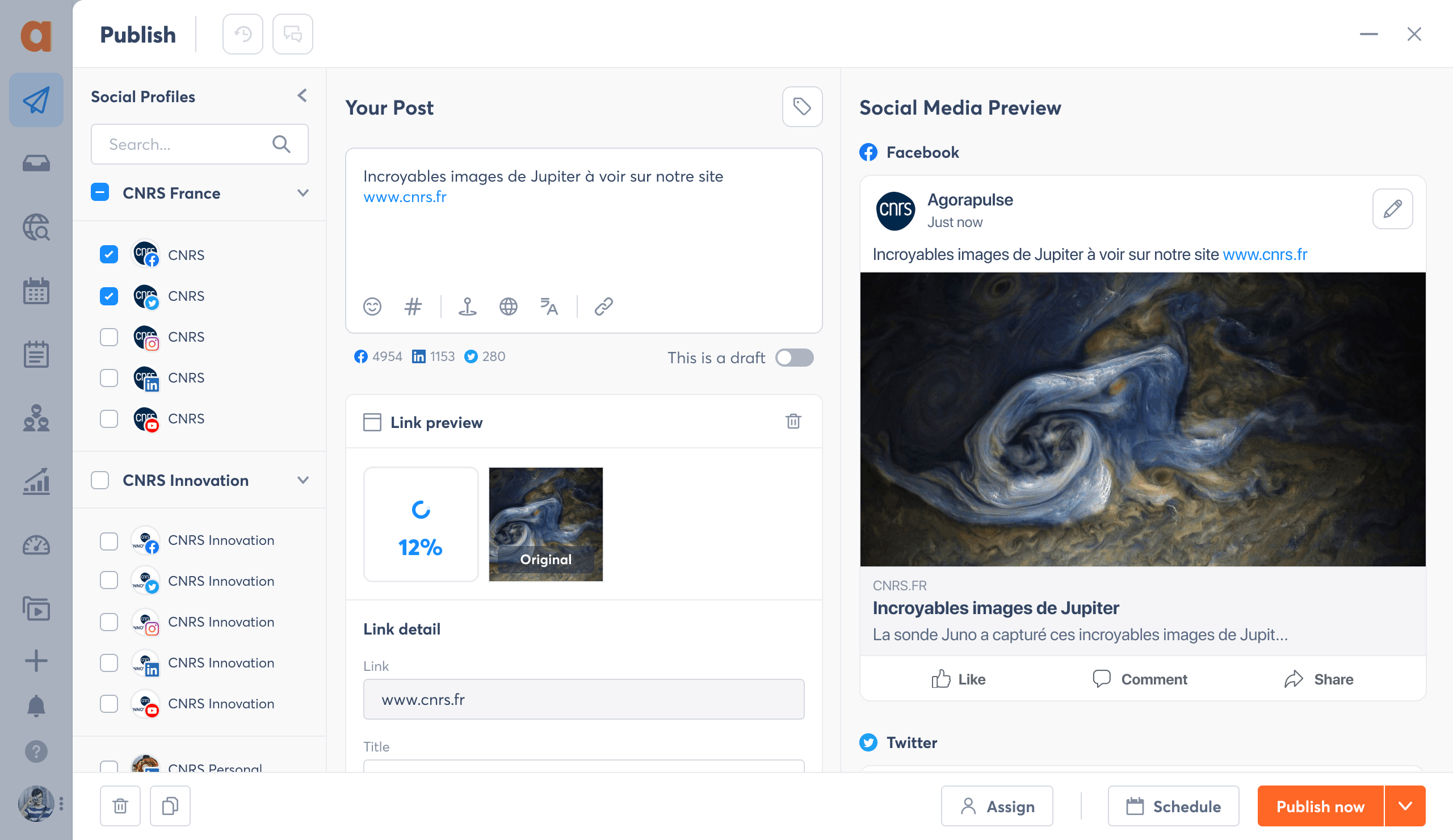
We redesigned the publishing workflow to simplify profile selection, clarify the editor, and provide richer real-time previews across all platforms.

publishing-agorapulse-before-1-min publishing-agorapulse-after-1-min

Subscription
The pricing page was rethought to highlight value differences between plans and support easier decision-making.

pricing-plan-agorapulse-before-def-min pricing-plan-agorapulse-after-min

WHAT WE IMPROVED

→  Modern visual hierarchy
→  Clearer navigation structure
→  Consistent behavior across all features
→  Harmonized UI components
→  Cleaner, more spacious layouts
→  Unified brand and product visual language
→  Streamlined flows with fewer steps

This first overview sets the stage for the deep transformation that follows.


DESIGN PRINCIPLES

To guide a redesign of this scale, I established a set of principles shared across design, product, and engineering.

1. Clarity over complexity
Every screen, component, and flow is optimized to reduce cognitive load.

2. Consistency as a foundation
A unified interaction model across all features and platforms.

3. Content first
The interface steps back so content, moderation, and insights take the spotlight.

4. Scalable and future-proof
A design system capable of supporting new squads, new features, and rapid iteration.


REVAMPING EVERY CORE FEATURE

1. REPORTS

Drag the slider to see the feature before and after the revamp

Clearer data hierarchy & more actionable reporting experience
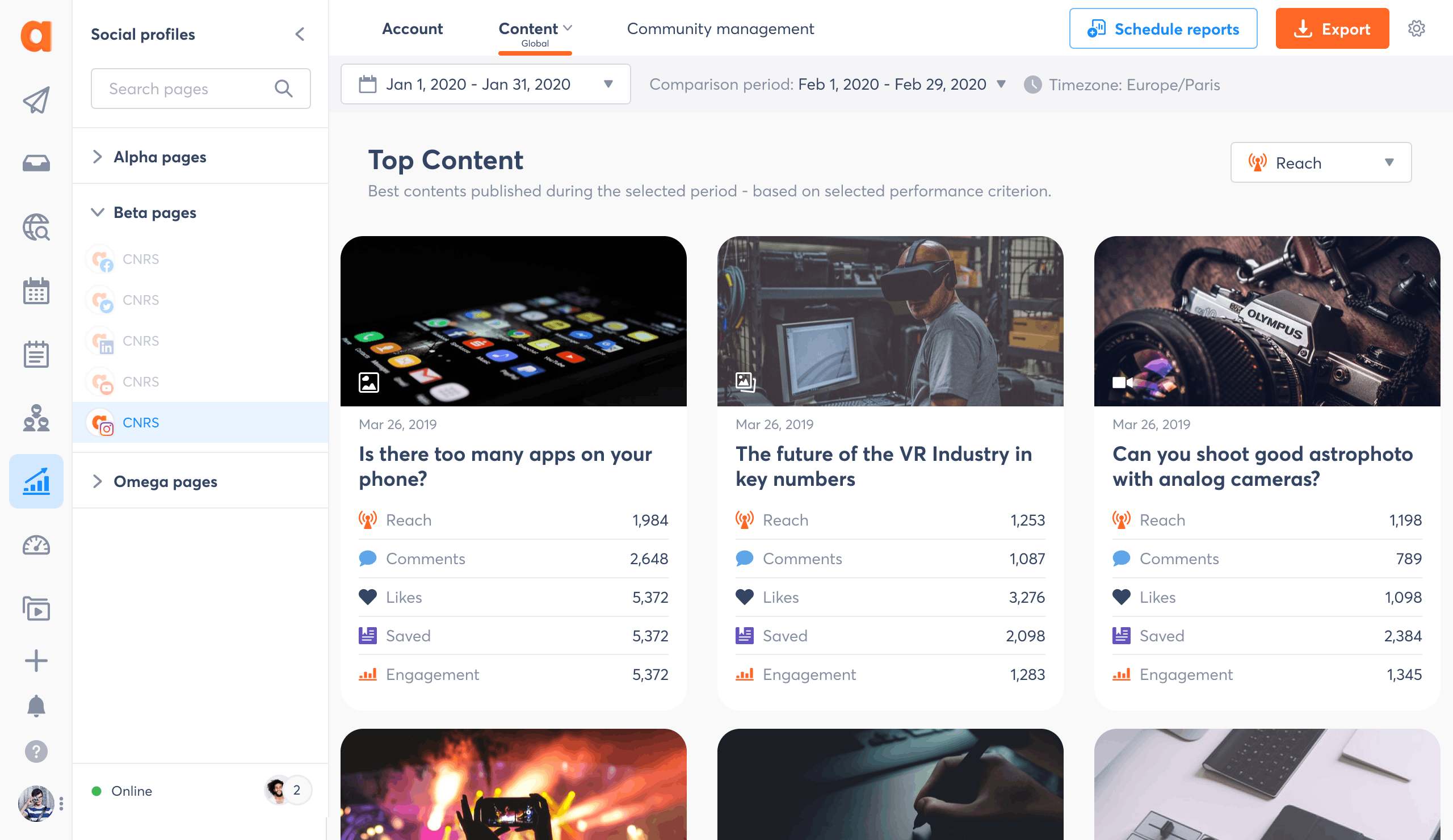
We redesigned the reporting module to make key metrics easier to understand at a glance. The new layout introduces a cleaner information structure, improved use of spacing, and clearly grouped KPIs. Charts now use a unified visual language with more intuitive colors, refined tooltips, and better contrast. This helps users interpret data faster, compare performance over time, and identify meaningful trends instantly.

reports-agorapulse-before-2-ok-min reports-agorapulse-after-2-min

Modernized charts with improved readability and visual consistency
The impressions chart was rebuilt from scratch with a modern line-graph system, clearer data points, and consistent color coding across all metrics. We removed unnecessary noise, improved the tooltip system, and introduced semantic color tones to differentiate paid, organic, and viral impressions. The result is a much more legible and trustworthy analytics experience, even for large time ranges.

reports-agorapulse-before-2-def-min reports-agorapulse-after-2-ok-min

Data Visualization UI Cards

audience-growth-reports-agorapulse-min
export-best-time-agorapulse-min
community-management-min
IG & TW-min
FB & IG-min
Content-min

ENHANCEMENTS

→  Updated typography for data-heavy layouts
→  Cleaner data visualization
→  More intuitive filters
→  Refined drill-down flows
→  Improved export UX

Reports now communicate insights more clearly and feel consistent across all data modules.

2. INBOX

Clearer triage workflow & cleaner conversation layout
We redesigned the Inbox layout to improve moderation efficiency: messages are now easier to scan, timestamps and actions follow a consistent hierarchy, and the conversation view is more breathable and readable. The new design reduces clutter and supports faster decision-making during high-volume moderation.

inbox-before-agorapulse-min inbox-agorapulse-after-1-min

Simplified message list with consistent states and improved readability
The message list now uses a unified structure with clearer states (new, reviewed, removed), improved spacing, and reduced visual noise. Each item is easier to identify, prioritise, and act on, helping teams navigate long queues with greater confidence and speed.

inbox-before-agorapulse-2-min inbox-agorapulse-after-2-min

Streamlined reply & attachment workflow
We improved the reply composer with a clearer hierarchy, refined input area, and a more intuitive attachment experience. Primary actions like Send, Assign and Review were reorganised to reduce ambiguity and increase workflow speed, making conversations smoother and moderation more reliable.

inbox-4-before-min inbox-4-after-min

UI Screens & Components behavior

Global layout (PM)-min
Global layout-min
User detail view (1)-min

ENHANCEMENTS

→  Cleaner moderation workflow
→  More intuitive assignment and filtering
→  Clearer hierarchy between messages, tasks, and conversations
→  Better visibility on context and user information
→  Streamlined bulk actions
→  Improved performance and readability

The Inbox is now easier to navigate, faster to act on, and more predictable for both new and expert users.

3. PUBLISHING & CALENDAR

A more structured composer with clearer media management and previews
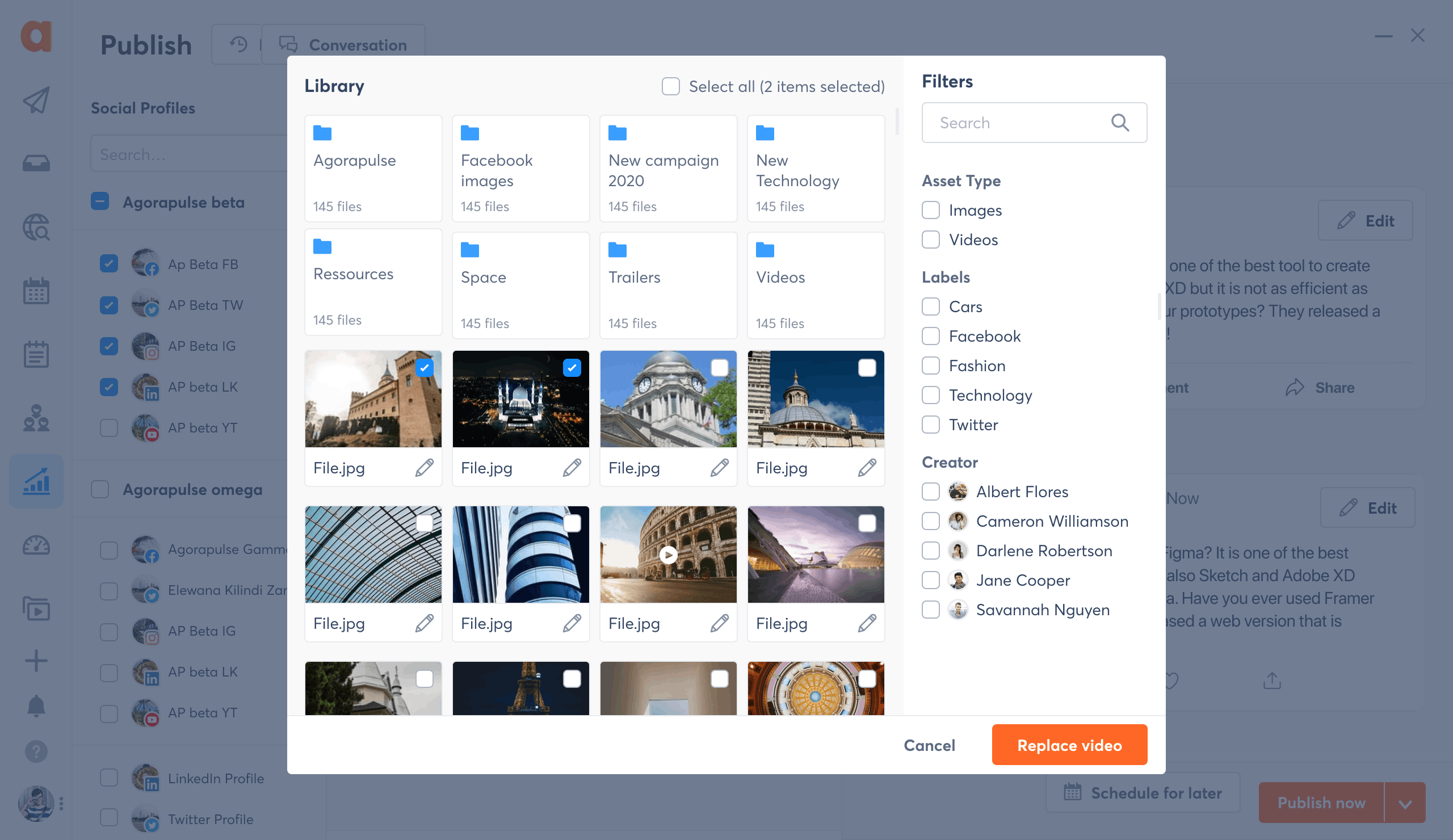
We moved the composer from a cramped modal to a full-width layout with three clear zones: profile selection, content editing, and live preview. Media handling is now integrated directly into the flow with a dedicated image strip and options, making it easier to manage multiple assets while keeping full visibility on how the post will appear once published.

publishing-agorapulse-before-1-min publishing-agorapulse-after-1-min

A simplified modal composer with clearer structure and more focused publishing workflow
We redesigned the modal composer to remove clutter and create a more focused posting experience. Profile selection, content editing, and preview are now clearly separated, reducing confusion and helping users stay oriented. The new layout improves readability, exposes key options more naturally, and makes drafting and scheduling posts smoother and more intuitive across multiple platforms.

publishing-2-before-min publishing-2-after-min

A clearer, more structured publishing timeline that surfaces what matters
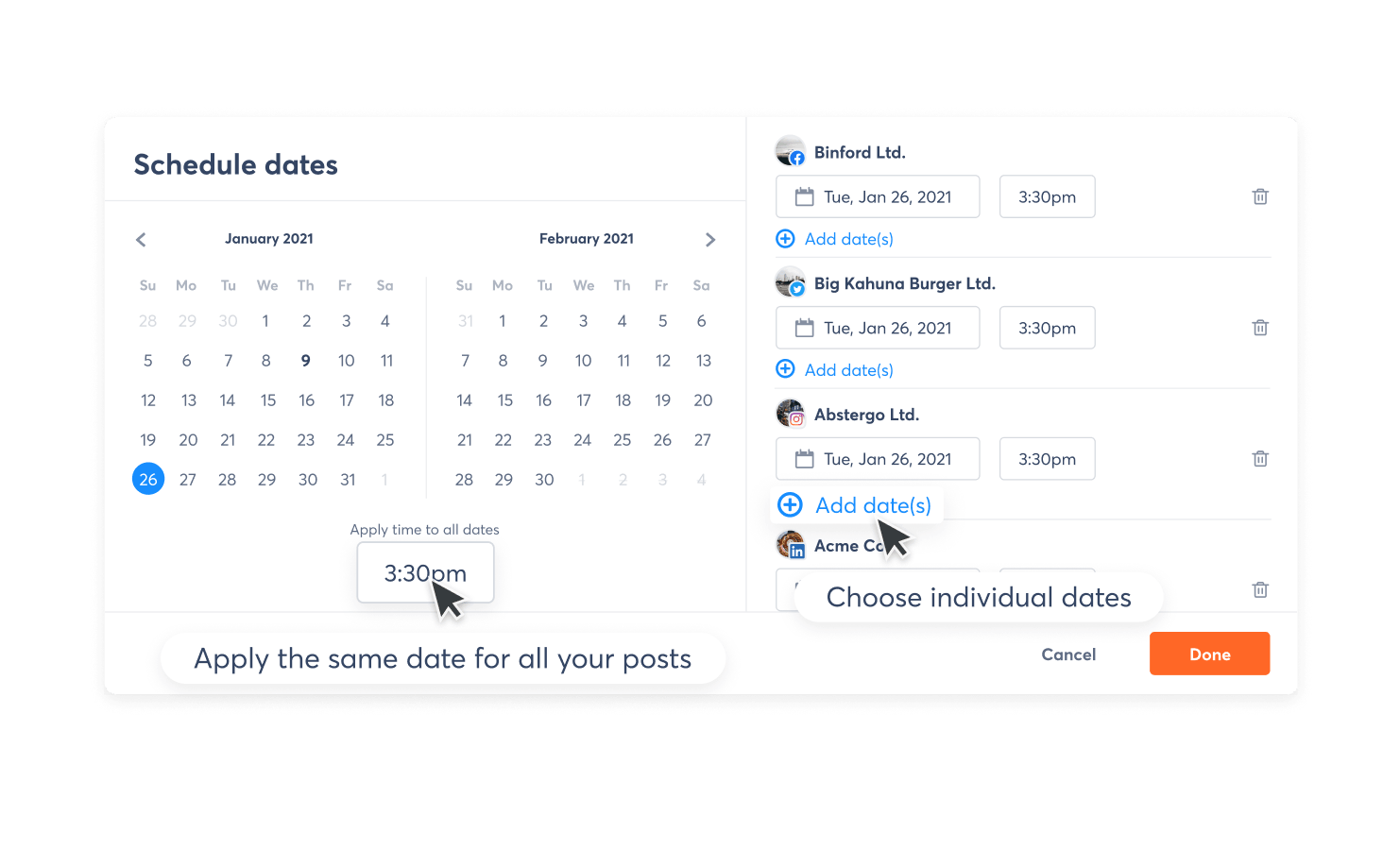
We redesigned the publishing list to make scheduled content easier to navigate and understand at a glance. Posts are now grouped by week and day with clean visual hierarchy, clearer timestamps, and simplified cards that highlight key actions without overwhelming the user. The new layout reduces visual noise, improves scanability, and supports faster content review and moderation; especially for teams managing large volumes of scheduled posts across multiple profiles.

publishing-viewlist-before-min publishing-viewlist-after-min

A cleaner, more readable calendar view that supports high-volume scheduling at a glance
 
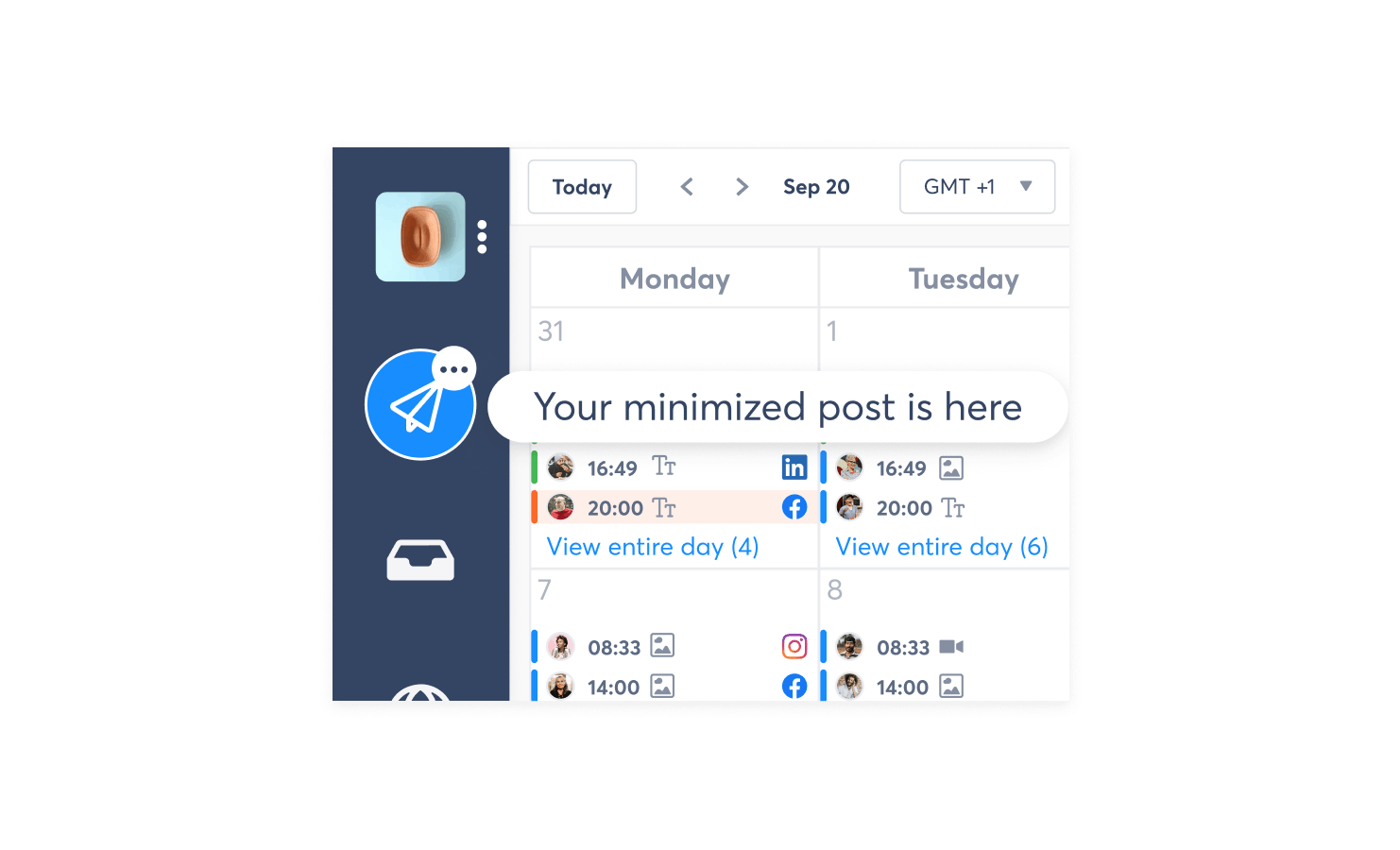
We redesigned the monthly calendar to handle dense content without overwhelming users. Clearer spacing, consistent iconography, and improved color markers make it easier to scan publishing patterns across profiles. Post groupings and inline counts reduce visual noise while still exposing essential details. The improved hierarchy helps social media managers quickly understand workload distribution, spot publishing gaps, and manage large cross-channel schedules with far better clarity and confidence.

publishing-4-before-min publishing-3-after-min

UI Screens & Components behavior

publishing-components-1-def-min
publishing-components-2-def-min
agorapulse-publishing-header-specs
agorapulse-publishing-footer-specs

ENHANCEMENTS

→  Complete redesign of the content creation experience
→  Simplified multi-platform workflow
→  Unified preview system
→  Clear scheduling logic
→  Improved feedback and validation steps

For a deeper look at the UX methodology behind this redesign, see the UX Process case study ; this feature was one of the most complex transformations.

4. ONBOARDING / SUBSCRIPTION / SETTINGS

A more welcoming, trust-driven, and conversion-optimized onboarding experience
 
We rebuilt the onboarding flow to reduce friction and increase user confidence from the very first interaction. Instead of the cold, centered dark modal, the new layout introduces a bright, brand-forward page with clear hierarchy, social proof, and reassuring messaging. Top-rated badges, customer testimonials, and a warm welcome headline create an immediate sense of trust. Form fields are simplified and spaced for readability, and all distractions, like the old Facebook login block or heavy CAPTCHA, were removed or streamlined. The result is a more human, more credible, and conversion-friendly signup experience that better reflects the product’s value and maturity.

before-sign-up-agora-ok-min Sign-up-agorapulse-after-min

A clearer, more guided flow for adding and managing social profiles
 
The onboarding step for connecting social profiles was redesigned to provide a far more intuitive setup experience. The new layout groups platforms visually, surfaces usage limits clearly, and displays already added profiles in a structured and scannable list. Each action, whether adding, reviewing or removing a profile, is now immediately visible and effortless to perform. This reduces cognitive load, prevents setup errors, and helps users complete onboarding faster with full confidence in the profiles they have connected.

3-before-min 3-after-min

A more engaging and guided first-step experience
 
We redesigned the first-step screen to make onboarding feel welcoming, intuitive, and actionable. Instead of a plain modal with a list of buttons, the new layout uses friendly 3D illustrations, clear task categories, and helpful microcopy to guide users toward the features that matter most. This visually rich entry point reduces cognitive load, drives earlier feature adoption, and creates a more delightful transition into the product from the moment the account is created.

4-before-min 4-after-min

A clearer, more transparent plan selection flow that simplifies comparison
 
The new pricing and plan selection experience presents information in a cleaner, more structured layout that makes evaluating options far easier. Feature limits, upgrades, and differences between plans are now visually aligned and easier to scan, helping users immediately understand what they gain when moving to a higher tier. The redesigned flow reduces hesitation, supports faster decision-making, and creates a more trustworthy upgrade moment with clearer value communication and a smoother checkout path.

pricing-plan-agorapulse-before-def-min pricing-plan-agorapulse-after-min

A cleaner and more intuitive way to organize profile groups
 
The new Menu/Groups view simplifies how users manage large sets of profiles. Clear visual hierarchy, better grouping structure, and improved search and selection make it easier to navigate, organize, and maintain profile collections without feeling overwhelmed.

5-before-min 5-after-min

5. MOBILE APP

A clearer, more visual publishing experience on mobile
 
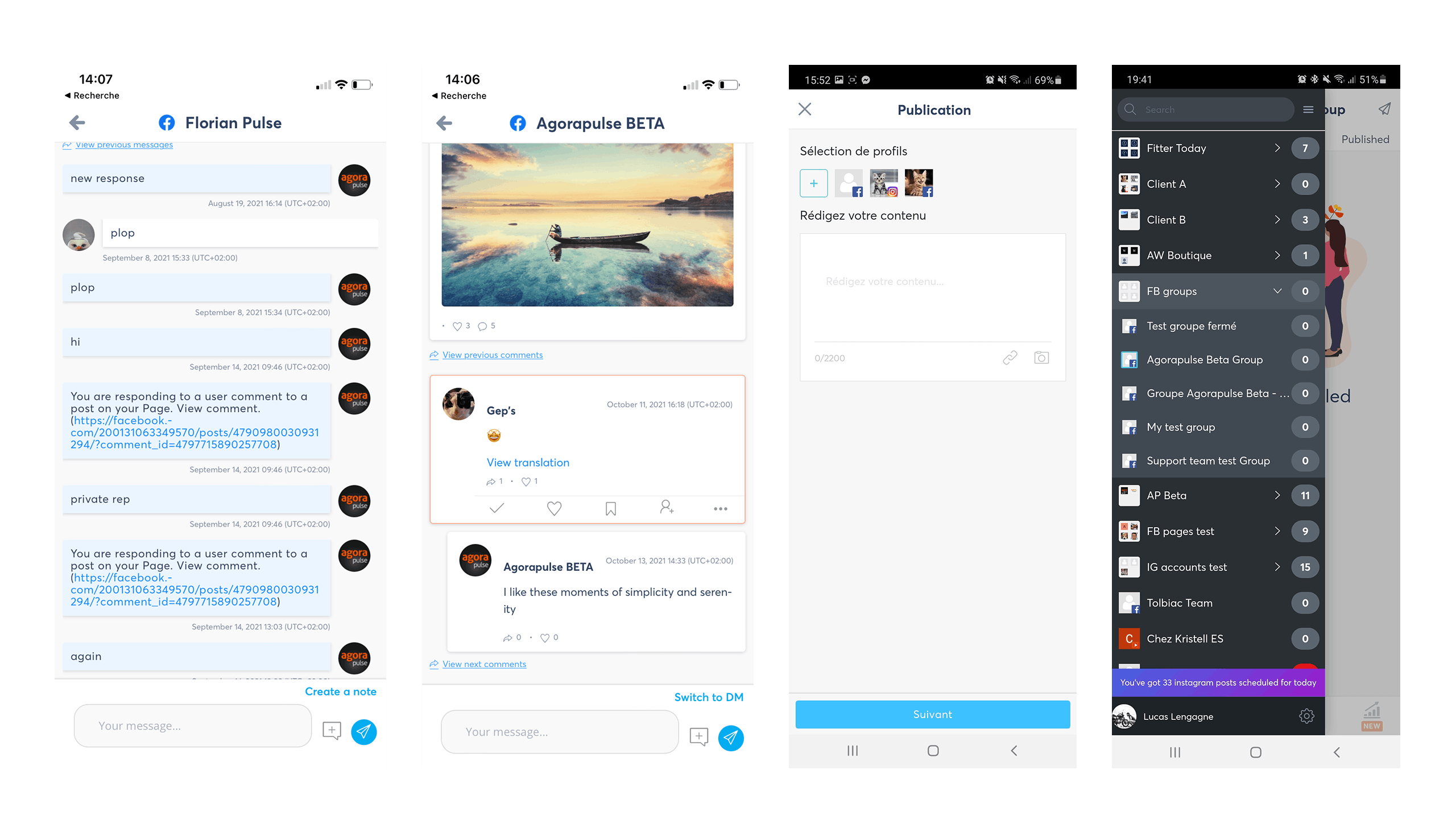
The mobile posts list was redesigned to feel lighter, more readable, and easier to scan on the go. Content previews are now more visual, spacing is improved, and key actions are cleaner and better aligned. The updated layout reduces noise, surfaces the right information instantly, and makes managing scheduled or published posts far more comfortable on a small screen.

mobile-publishing-list-ok-min

A cleaner, more actionable mobile inbox
 
We reworked the mobile inbox to make conversations easier to scan and act on. Messages now appear in clearer cards with stronger hierarchy, improved spacing, and more intuitive action buttons. The new layout reduces visual noise, highlights context at a glance, and helps users process, assign, or reply to messages faster while on the move.

inbox-list-view-agorapulse-mobile-min

A clearer, more conversational mobile comment view
 
We redesigned the mobile comment workflow to highlight context, improve readability and streamline actions. Comments now appear in structured cards with clearer hierarchy, threaded replies, and immediately accessible moderation tools. The new layout makes it easier to follow conversations, respond quickly and manage interactions with the same confidence as on desktop.

mobile-reply-comment-min

A more intuitive and conversational mobile DM experience
 
We refined the mobile DM flow to feel closer to a real messaging app. Messages are now easier to read, threaded replies are clearer, and contextual details like timestamps and sender identity are more visible. Internal notes sit naturally within the conversation, and replying is simpler and faster thanks to a cleaner input area and clearer action buttons. The result is a smoother, more human DM experience that supports both speed and accuracy.

inbox-dm-min

A clearer and more reassuring Instagram publishing handoff
 
We redesigned the Instagram handoff flow to provide a calmer, more guided experience. The steps are now explained with better hierarchy, improved readability, and clearer visual cues, helping users understand exactly what will happen next. Key actions like saving media, copying captions, and opening Instagram feel more intentional, reducing confusion and making manual publishing smooth and stress-free.

IG-grid-agorapulse-mobile-min

The mobile app was redesigned to fully align with the new UI & UX language:

→  New navigation
→  Better moderation workflows
→  Unified interaction patterns with desktop
→  Consistent components and spacing
→  Enhanced readability and ergonomics

This was not a port of the desktop ; it was a native, mobile-first reinterpretation of the new system.

THE DESIGN SYSTEM

This revamp led to the creation of a complete design system, built from scratch and adopted across all teams ; design, product, and engineering.

FOUNDATIONS & COMPONENTS

→ Color tokens & typography
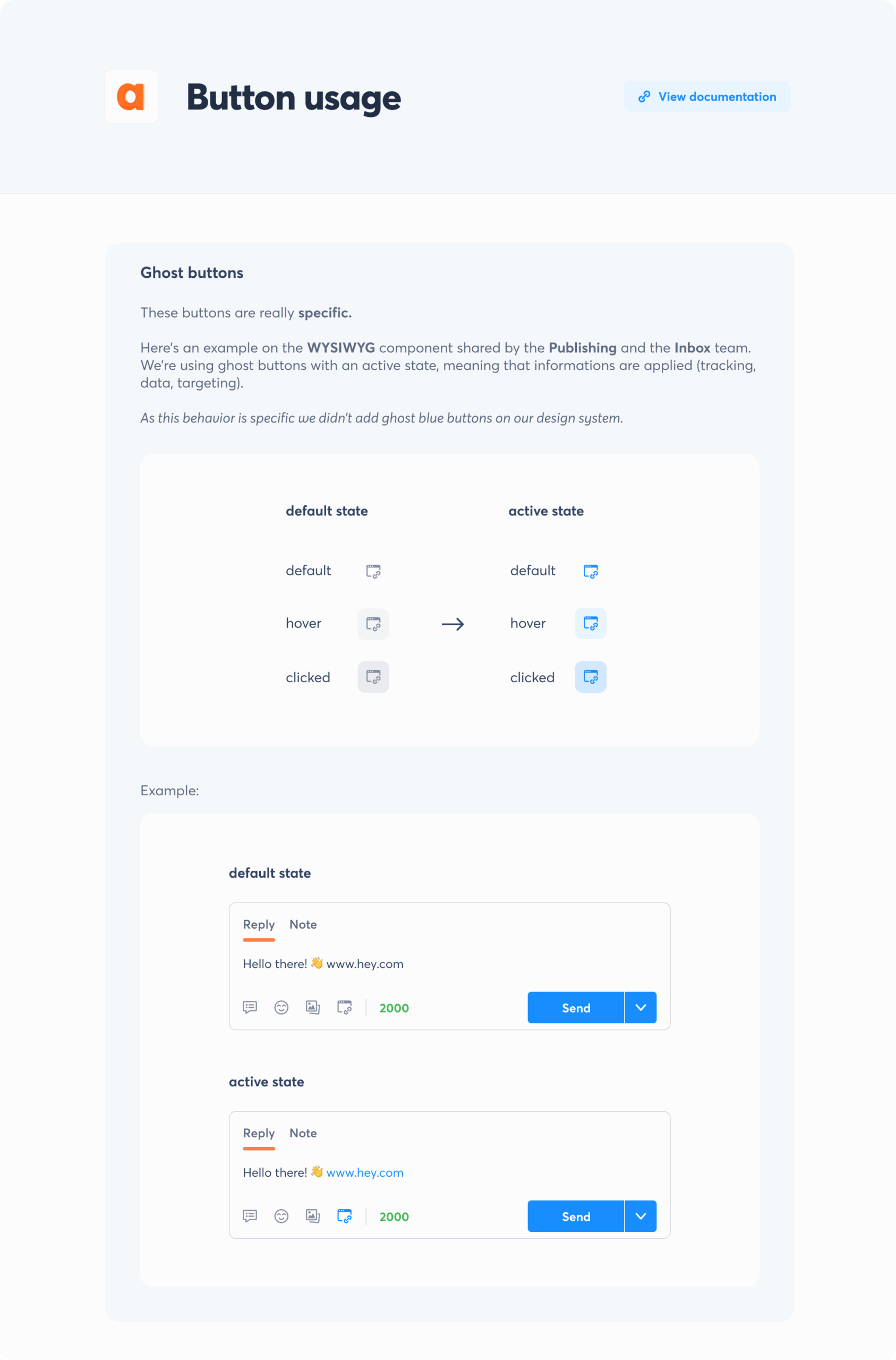
→ Buttons, inputs, selectors, dropdowns
→  Navigation elements
→  Tables & lists
→  Cards & modules
→  Toasts, alerts, feedback
→  Drawers, modals, overlays
 

Orange-agorapulse-design-system-min
blue-agorapulse-design-system-min
Grey-agorapulse-design-system-min
Buttons-DS-1-min
DS-2-ok-min
Dropdown-min
input-ok-min
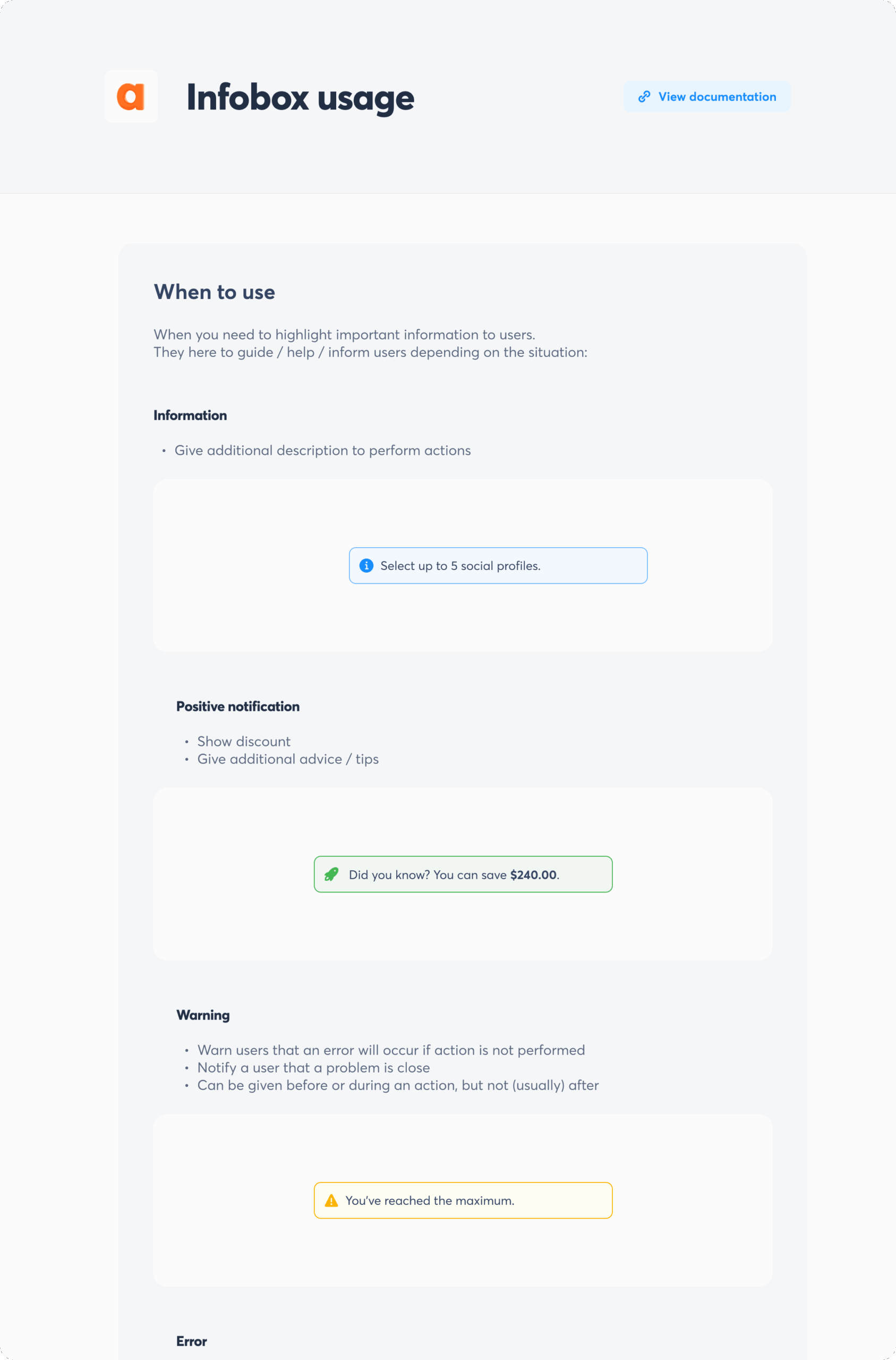
infobox-ok-min
leftnav-min
Emoji picker

DOCUMENTATION

→ Usage guidelines
→ Do/Don't examples
→ Code snippets
→ Contribution process
→ Versioning system
 

Read me (2)
Infobox (1)-min
Medium-min
Snackbars-min

The design system radically improved speed, clarity, and quality across the company and is now the backbone for product scalability.
(For how we organized the design practice around it, see Design Strategy.)
 

IMPACT

USER IMPACT

→ Increased task completion across core workflows
→ Faster publishing and moderation
→ Clearer navigation, fewer errors
→ Higher satisfaction scores in interviews and surveys

PRODUCT IMPACT

→ Stronger perception of product quality
→ Higher adoption of new features
→ Smoother onboarding for new users
→ Better alignment with brand positioning

ENGINEERING IMPACT

→ Faster delivery thanks to the component library
→ Reduced number of visual bugs
→ Clearer communication between design & dev
→ More predictable UI development

CONCLUSION

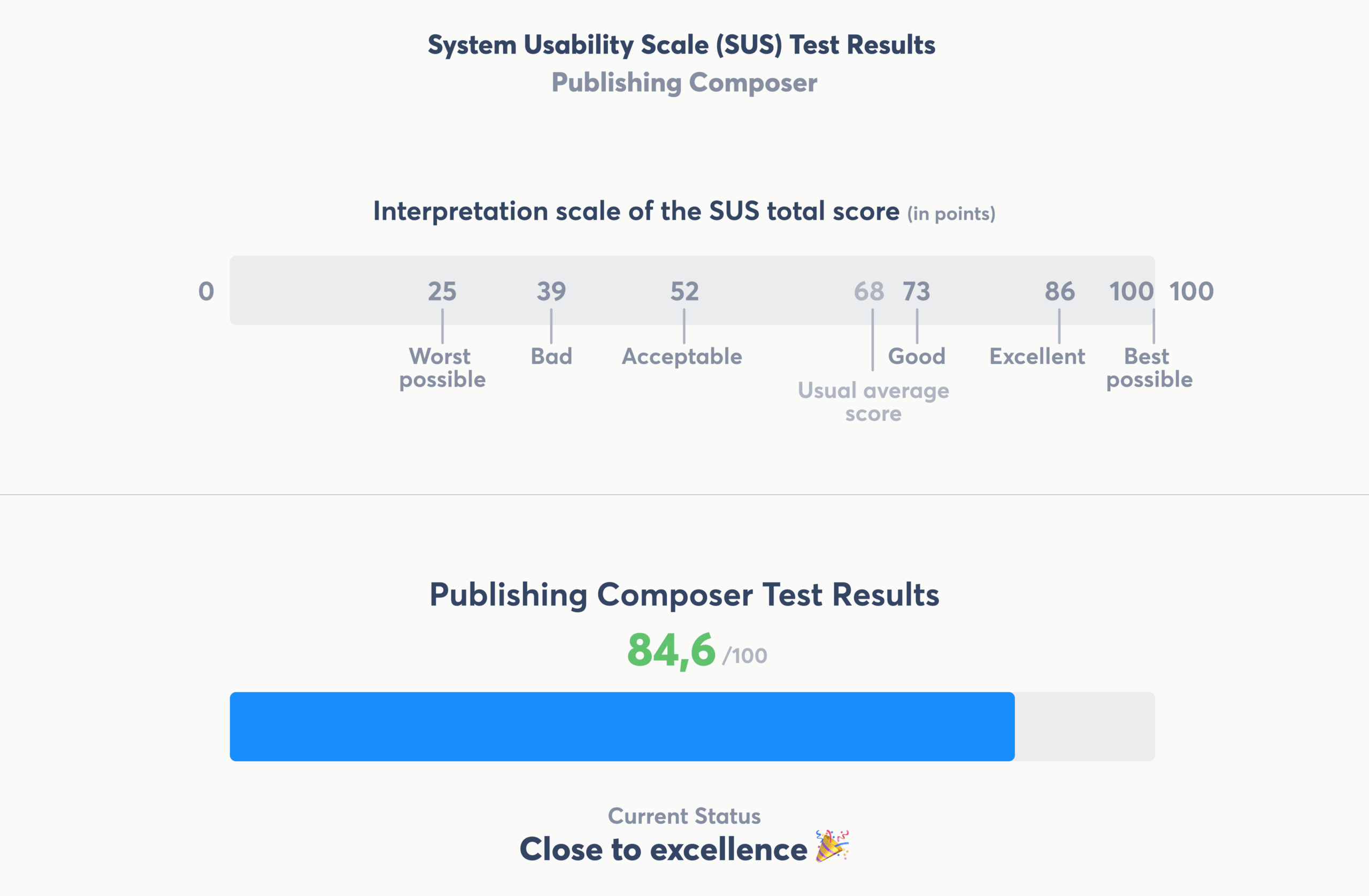
The full product revamp at Agorapulse was one of the most ambitious initiatives I led: a complete redesign of the entire product experience, across web, mobile, UI, flows, and system foundations.

It demonstrates my ability to:

→ Drive large-scale product transformations
→ Lead UX, UI, product thinking, and design system creation
→ Deliver high-quality, modern SaaS interfaces
→ Align brand, product, and engineering
→ Improve user experience, product clarity, and development speed

The result is a modern, cohesive, scalable product that supports Agorapulse’s long-term vision and empowers tens of thousands of users daily.

TESTIMONIALS

sebastien-agorapulse

"Lucas brought design at Agorapulse to the next level.
He introduced a new design system, redesigned all the core features, and established a strong brand design foundation.
Beyond his craft, Lucas has been a key leader for the team; mentoring designers, improving processes, and helping everyone grow.
He’s a true asset for the product organization, and his impact is still visible across the company."

yoann-agorapulse

"Lucas doesn’t just create beautiful design; he builds visual systems that are durable and high-performing.
The full rebranding he led at Agorapulse was a true turning point: nearly 5 years later, the foundations he created are still in use and continue to carry the brand.
His work was essential in strengthening our credibility in Europe and supporting our strong growth in the United States.
For a marketing director, having a partner who combines creative vision with a deep understanding of international business challenges is invaluable.”

Yoann Fondelot
Director of Marketing & Business Development Europe @Agorapulse

WANT TO GET YOUR PRODUCT TO THE NEXT LEVEL?

Lucas Lengagne | Senior / Lead Product Designer (Freelance)
2025 © All rights reserved